
Smart Audio Converter15.11 - Download
You'll be able to download in few seconds.
Publisher Description
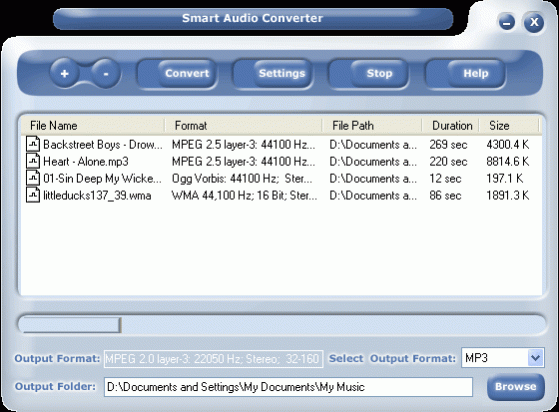
A powerful audio converter that easily and quickly batch converts audio files between many popular audio formats like MP3, WAV, WMA, AC3, MPEG, OGG, MP2, MPC, RAW audio, VOX, MPC, G.726, G.723, G.721, AIFF and AU. You can easily choose between formats that you want to convert - like your WAV files to a compact MP3 format - at excellent speed and digital quality. Or quickly create quality WAV from MPEG files; you can also create these into MP3 files to play them on your MP3 player, or even convert WMA files to WAV, MP3, or other formats. And choose from many other flexible options - your audio file conversion was never so easy!
Absolute ease -
Easy to use, the user-friendly interface is intuitive and converts your files in just three easy steps. Easily navigable, it is designed for all levels of users. You don't need expertise in file formats or confusing bitrate settings to use this Smart audio converter but will find its advanced features powerful if you are an experienced user.
Simply a Smart audio converter-
A high performance, superior quality audio converter, its conversion power, ease of use, speed, excellent output quality and versatile feature set make it just simply the best audio conversion program.
About Smart Audio Converter
This Rippers & Converters program is available in English. It was last updated on 29 September, 2026. Smart Audio Converter is compatible with the following operating systems: Windows.
The company that develops Smart Audio Converter is Smart Soft. The latest version released by its developer is 15.11.
The download we have available for Smart Audio Converter has a file size of N/A. Just click the green Download button above to start the downloading process. The program is listed on our website since 2019-11-09 and was downloaded 0 times. We have already checked if the download link is safe, however for your own protection we recommend that you scan the downloaded software with your antivirus. Your antivirus may detect the Smart Audio Converter as malware if the download link is broken.
How to install Smart Audio Converter on your Windows device:
- Click on the Download button on our website. This will start the download from the website of the developer.
- Once the Smart Audio Converter is downloaded click on it to start the setup process (assuming you are on a desktop computer).
- When the installation is finished you should be able to see and run the program.
Program Details
System requirements
Download information
Pricing
Version History
version 15.11
posted on 2019-11-09
version 6.5
posted on
~ Remove duplicate files easier - new duplicate file remover version lends itself admirably for duplicate file removing in music and photo collections, document and file archives
~ Remove duplicate files, remove duplicate files with music and remove duplicate photos with new start-up wizard
Disclaimer
External Download
We do not host Smart Audio Converter on our servers. We did not scan it for viruses, adware, spyware or other type of malware. This app is hosted by the software publisher and passed their terms and conditions to be listed there. We recommend caution when installing it.
The external download link for Smart Audio Converter is provided to you by apps112.com without any warranties, representations or guarantees of any kind, so access it at your own risk.
If you have questions regarding this particular app contact the publisher directly. For questions about the functionalities of apps112.com contact us.
